
Module: Plotting#
One of the main usecases of SegTraQ is to compare different segmentation methods. To facilitate this task, you can make use of the plotting module (pl). In order to use it, you need to prepare your data in the form of a dictionary that maps the method name to the corresponding SegTraQ object.
To follow along with this tutorial, you can download the data from here.
Data Preparation#
First, we need to get the data into the right format. This closely follows the Xenium Focus.
[1]:
%load_ext autoreload
%autoreload 2

import warnings

warnings.filterwarnings(action="ignore")
[2]:
import anndata as ad
import matplotlib.pyplot as plt
import scanpy as sc
import spatialdata as sd
import spatialdata_plot  # noqa

import segtraq

segtraq.settings.n_jobs = -1  # Use all available CPU cores
[3]:
# === READING SPATIALDATA OBJECTS ===
sdata_xenium_ws = sd.read_zarr("../../data/xenium_5K_data/xenium.zarr")
sdata_bidcell_ws = sd.read_zarr("../../data/xenium_5K_data/bidcell.zarr")
sdata_proseg_ws = sd.read_zarr("../../data/xenium_5K_data/proseg2.zarr")
sdata_segger_ws = sd.read_zarr("../../data/xenium_5K_data/segger.zarr")

# === CROPPING ===
bb_xmin = 800
bb_ymin = 1150
bb_w = 200
bb_h = 300
bb_xmax = bb_xmin + bb_w
bb_ymax = bb_ymin + bb_h


def crop(ws):
    return ws.query.bounding_box(
        axes=["x", "y"],
        min_coordinate=[bb_xmin, bb_ymin],
        max_coordinate=[bb_xmax, bb_ymax],
        target_coordinate_system="global",
    )


sdata_xenium = crop(sdata_xenium_ws)
sdata_bidcell = crop(sdata_bidcell_ws)
sdata_proseg = crop(sdata_proseg_ws)
sdata_segger = crop(sdata_segger_ws)

# === CREATING SEGTRAQ OBJECTS ===
st_xenium = segtraq.SegTraQ(
    sdata_xenium, images_key="image", tables_centroid_x_key="x_centroid", tables_centroid_y_key="y_centroid"
)
st_bidcell = segtraq.SegTraQ(
    sdata_bidcell,
    images_key="image",
    points_background_id=0,
    tables_area_key=None,
    tables_centroid_x_key="cell_centroid_x",
    tables_centroid_y_key="cell_centroid_y",
)
st_proseg = segtraq.SegTraQ(
    sdata_proseg,
    images_key="image",
    points_cell_id_key="assignment",
    points_background_id=2**32 - 1,
    points_gene_key="gene",
    tables_area_key=None,
    tables_cell_id_key="cell",
    shapes_cell_id_key="cell",
    tables_centroid_x_key="centroid_x",
    tables_centroid_y_key="centroid_y",
)

st_segger = segtraq.SegTraQ(
    sdata_segger, images_key="image", tables_centroid_x_key="cell_centroid_x", tables_centroid_y_key="cell_centroid_y"
)

# === PUTTING EVERYTHING INTO A DICTIONARY ===
st_dict = {"xenium": st_xenium, "bidcell": st_bidcell, "proseg": st_proseg, "segger": st_segger}
no parent found for <ome_zarr.reader.Label object at 0x7fff7ddae900>: None
no parent found for <ome_zarr.reader.Label object at 0x7fff7dc65d10>: None
no parent found for <ome_zarr.reader.Label object at 0x7fff7e606850>: None
no parent found for <ome_zarr.reader.Label object at 0x7fff7e257950>: None
Run desired metrics#
Now, we can run all of the metrics we want on this dataset. For now, we simply run a label transfer and run some scanpy functions to compute the UMAP coordinates.
[4]:
# Load scRNA-seq data
adata_ref = ad.read_h5ad("../../data/xenium_5K_data/BC_scRNAseq_Janesick.h5ad")

# Transfer labels
for _method, st in st_dict.items():
    st.run_label_transfer(adata_ref, ref_cell_type="celltype_major", ref_raw_counts_layer="raw", inplace=True)
WARNING: adata.X seems to be already log-transformed.
WARNING: adata.X seems to be already log-transformed.
WARNING: adata.X seems to be already log-transformed.
WARNING: adata.X seems to be already log-transformed.
Plots for individual samples#
The pl module provides methods to plot different things: on one hand, it can be used to visualize certain characteristics of a sample, and on the other, it can be used to compare between different samples or segmentation methods. Let’s start by looking at some sample-specific plots. Specifically, we can look at the distribution of transcripts and different segmentation features across the x and y coordinate. For some technologies (such as CosMx), this can help to detect stitching artefacts.
[5]:
# transcript distribution across the x and y axis of the image
# the filter size (default: 21) can be used to get an idea for broader trends
_ = st_xenium.pl.transcript_distribution_across_space(filter_size=21)
[6]:
# features of the segmentation across the axes
_ = st_xenium.pl.feature_distribution_across_space(features=["cell_area", "nucleus_area"], filter_size=21)
We can see two things here: for the Xenium segmentation, the right part of the image contains more transcripts. Its cells are also larger. We can use spatialdata_plot to have a look at the actual data.
[7]:
fig, ax = plt.subplots(1, 2, figsize=(7, 7), dpi=100)
st_xenium.sdata.pl.render_points("transcripts", size=0.01, color="red", method="matplotlib").pl.show(ax=ax[0])
st_xenium.sdata.pl.render_shapes("cell_boundaries").pl.show(ax=ax[1])
Here, this is actually due to the structure of the tissue (large tumor cells are on the right side of the image). When applying these methods on larger tissues, they can also help to detect technical artefacts.
Comparing between segmentation methods#
We can also use the pl module to compare between different segmentation methods. All we need to do is pass our dictionary of SegTraQ objects.
[8]:
_ = segtraq.pl.celltype_proportions(st_dict, celltype_col="transferred_cell_type")
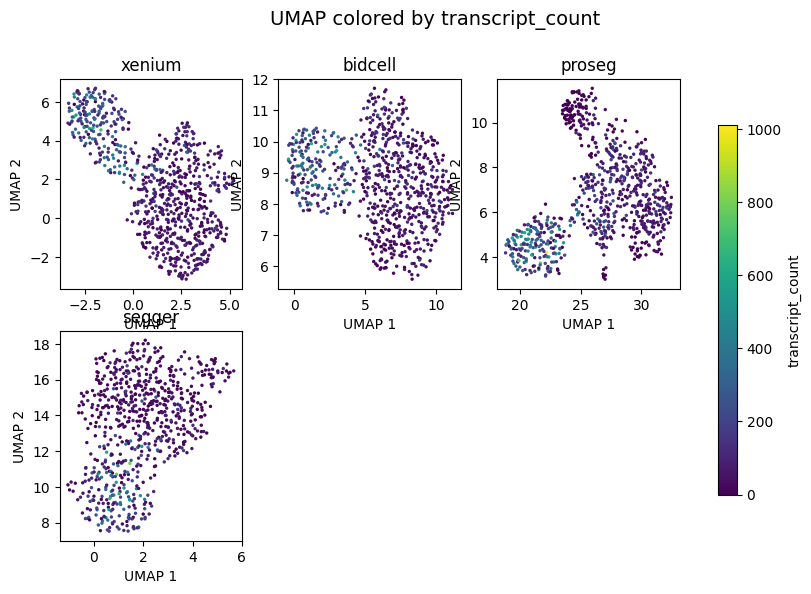
Before we can plot the UMAP, we need to actually compute it.
[9]:
for _, st in st_dict.items():
    # extracting the anndata object from the spatialdata object and performing appropriate normalization
    adata = st.sdata.tables["table"]
    adata.layers["raw"] = adata.X.copy()
    sc.pp.normalize_total(adata, inplace=True)
    sc.pp.log1p(adata)
    sc.pp.pca(adata)
    sc.pp.neighbors(adata)
    sc.tl.umap(adata)
[10]:
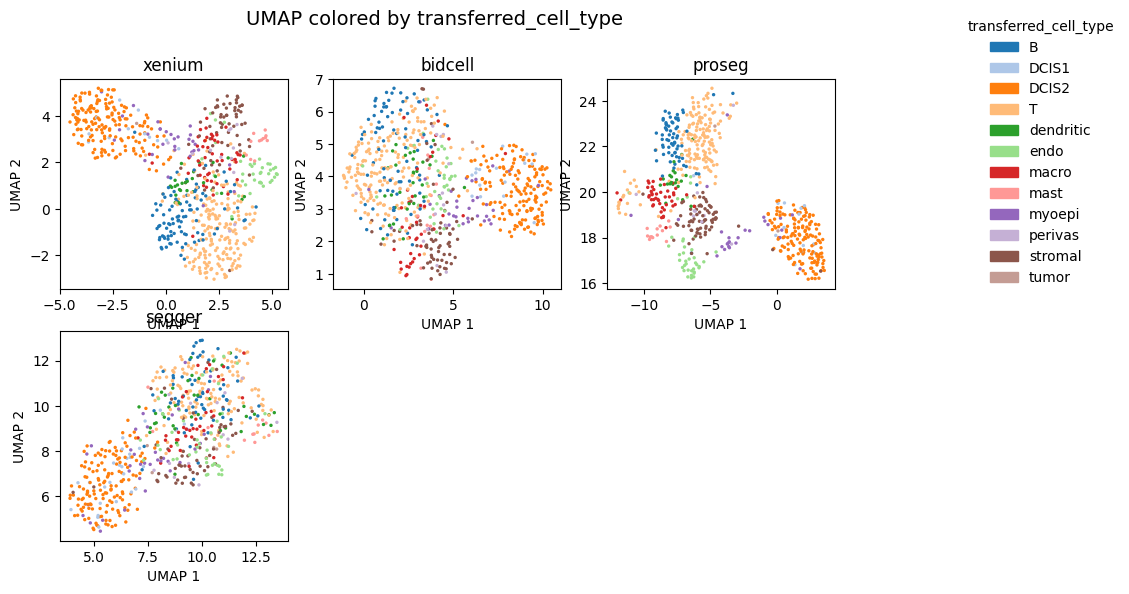
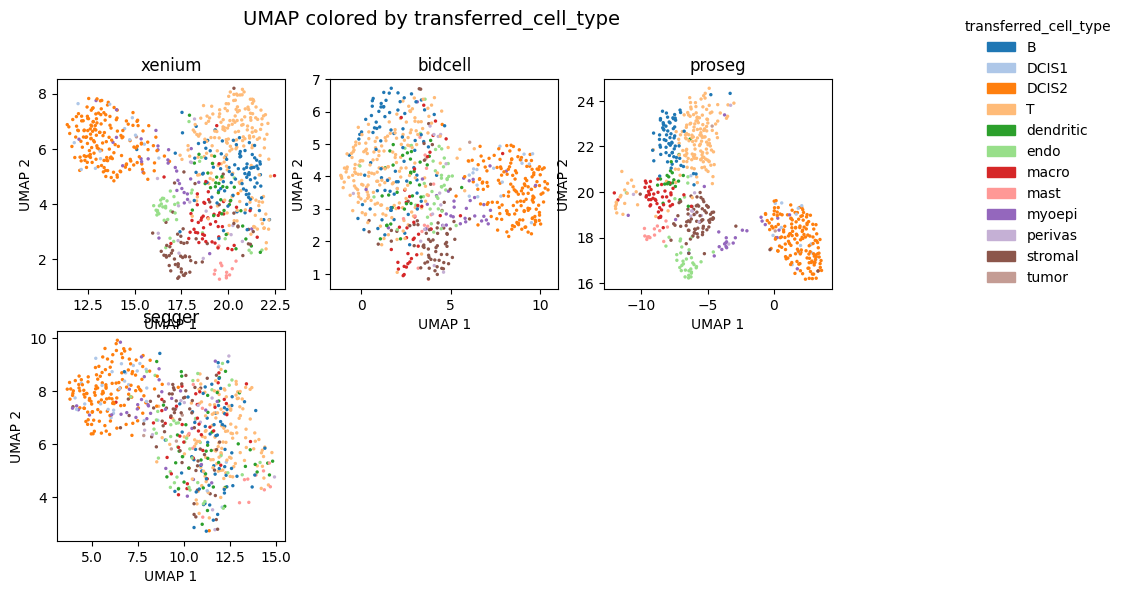
_ = segtraq.pl.umap(st_dict, color="transferred_cell_type", legend=True, figsize=(10, 6))
[11]:
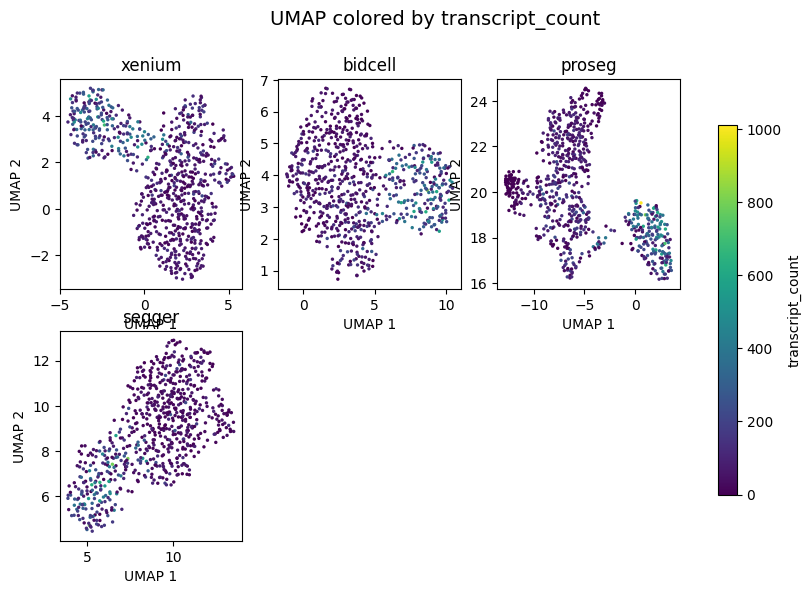
_ = segtraq.pl.umap(st_dict, color="transcript_count", legend=True, figsize=(10, 6))
[12]:
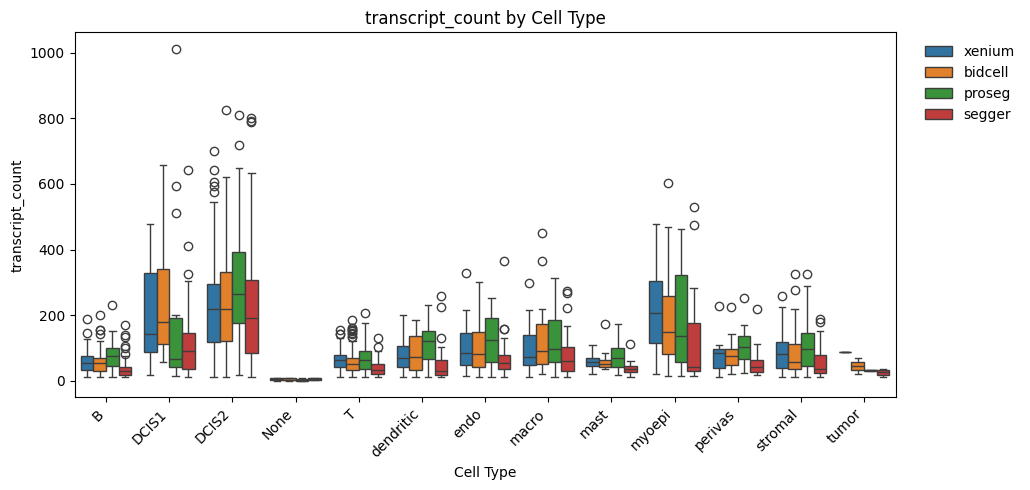
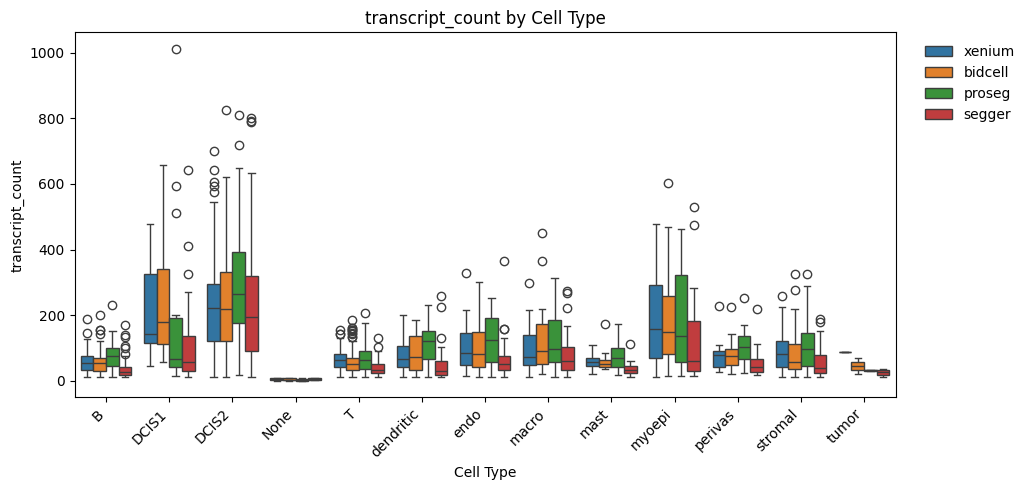
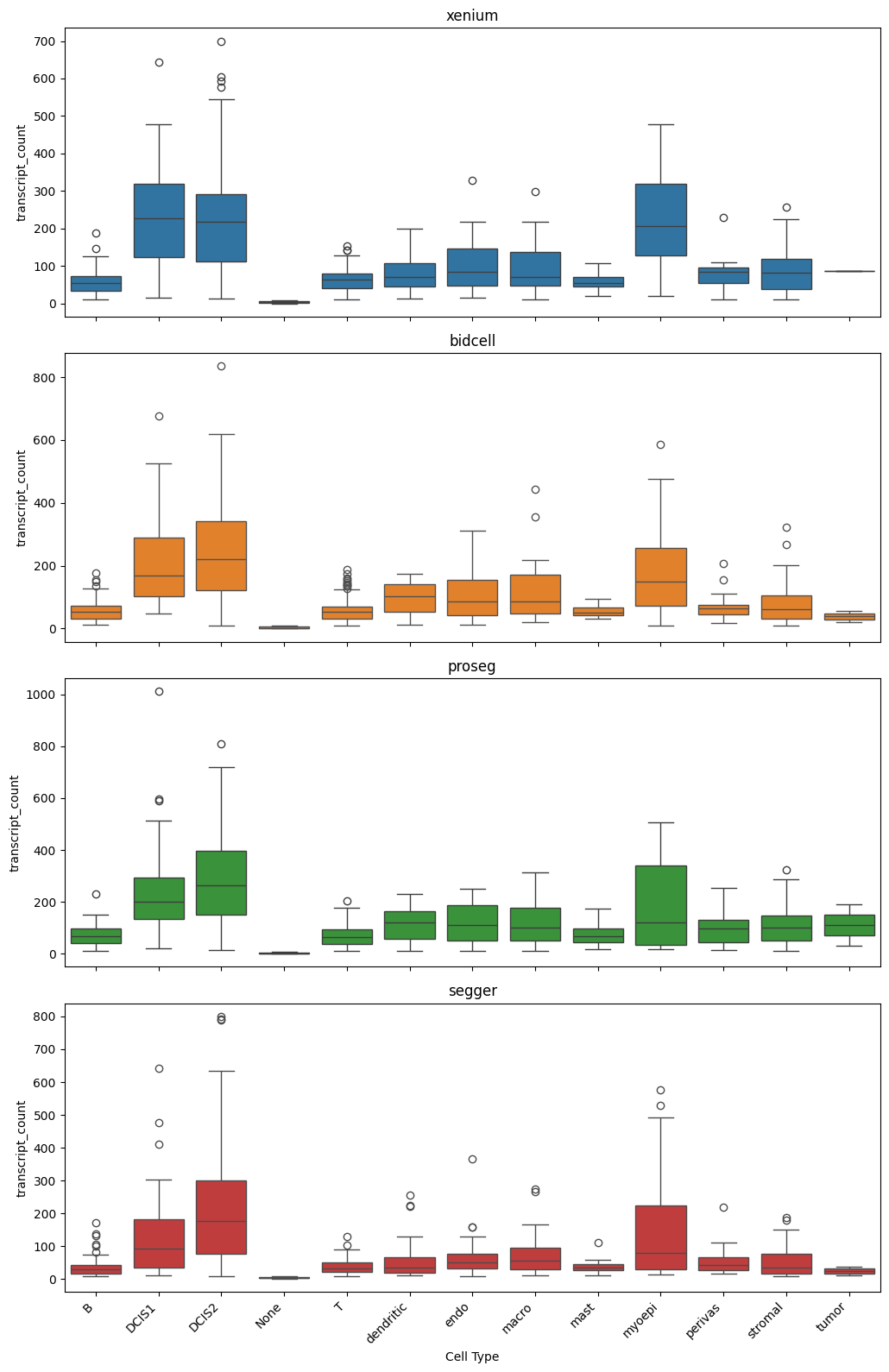
_ = segtraq.pl.boxplot(st_dict, celltype_col="transferred_cell_type", value_key="transcript_count")
[13]:
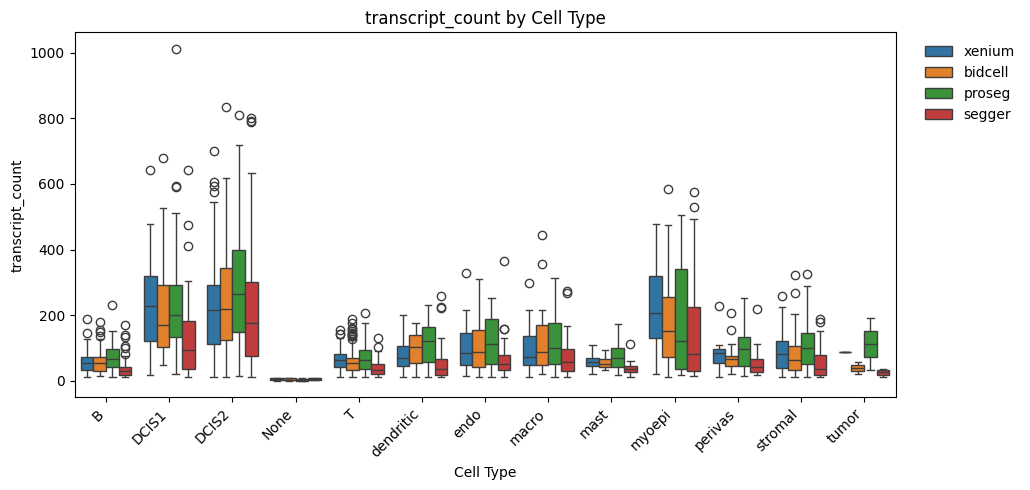
_ = segtraq.pl.boxplot_combined(st_dict, celltype_col="transferred_cell_type", value_key="transcript_count")
Session Info#
[14]:
print(sd.__version__)  # spatialdata
print(spatialdata_plot.__version__)
0.8.0
0.4.0